
Download Nitro PDF Reader (32-bit) – PDF reader, PDF editor, PDF tools, document management, free PDF reader
Overview
Nitro PDF Reader (32-bit) is a free mobile application designed for users who require reliable and efficient access to PDF documents on Windows platforms. The app functions as a comprehensive PDF reader and document management tool, offering a suite of features that support reading, editing, annotating, and sharing PDF files. It is particularly suited for professionals, students, and individuals managing digital documentation in everyday workflows. The application is developed by Nitro PDF, a known name in the digital document space, though no additional details about the company’s background were provided.
The app addresses common challenges in document handling, such as limited editing capabilities in standard PDF viewers, the need for secure form filling, and the difficulty of converting non-PDF files into PDF format. By integrating a range of tools into a single interface, Nitro PDF Reader streamlines document interaction, reducing the need for multiple third-party applications. Real-world use cases include reviewing contracts, completing online forms, annotating academic papers, and creating shareable PDFs from various document types.
Within the broader productivity ecosystem, Nitro PDF Reader fills a niche for users seeking a free yet powerful alternative to proprietary PDF software. Its ability to function without watermarks and offer advanced tools at no cost enhances its value proposition. The app is especially relevant for users operating on older or low-resource systems, as the 32-bit version ensures compatibility with legacy hardware and operating environments.
Key Features & Functionality
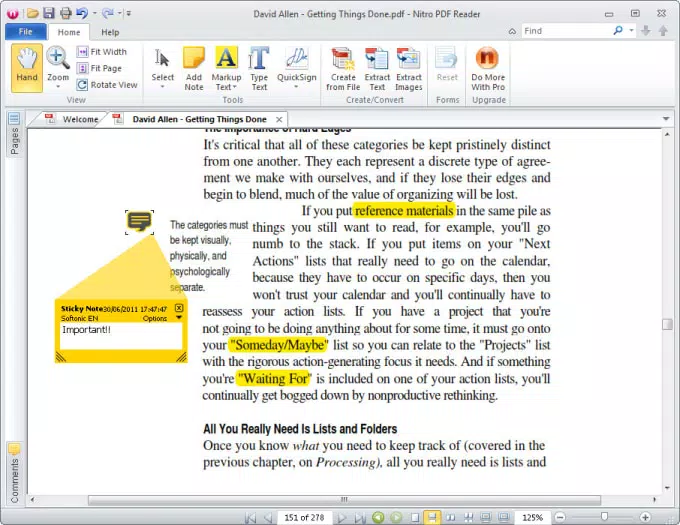
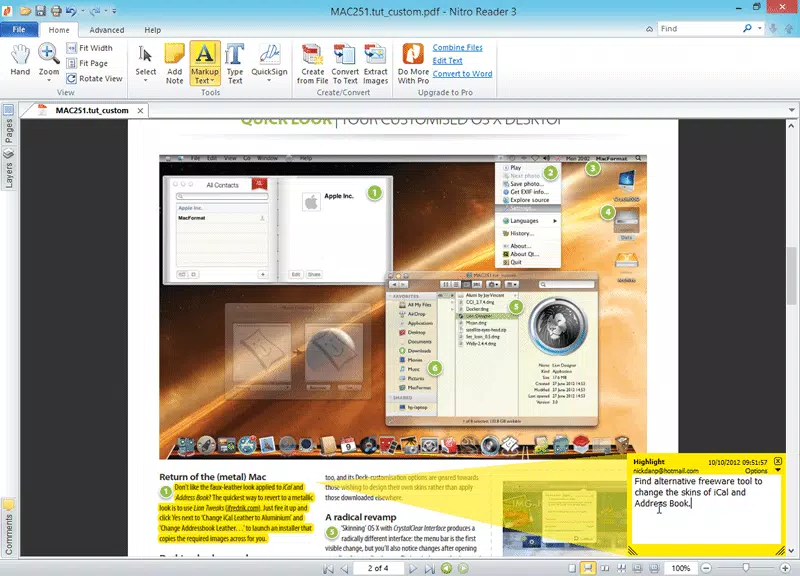
Nitro PDF Reader (32-bit) delivers a robust set of tools tailored for efficient PDF interaction. The core functionality centers around document creation, editing, annotation, and secure sharing—all available at no cost. The application supports adding comments using notes and text markup, enabling users to highlight key points or provide feedback directly within the document. This feature is particularly useful for collaborative workflows, such as peer reviews or team-based project documentation.
Users can fill out interactive forms and securely sign documents, which is essential for legal, administrative, and academic processes. The ability to print to PDF allows for quick conversion of any printable content into a standardized digital format. Another standout feature is the drag-and-drop PDF creation tool, which enables users to convert existing documents into PDFs by simply dragging them into the application window. Although the process may take a few seconds to initiate, the overall conversion is efficient and reliable.
- Comment on PDFs with notes and text markup
- Fill out and submit interactive forms
- Securely sign documents digitally
- Create PDFs via drag-and-drop functionality
- Print to PDF from any printable source
- Search within documents for quick information retrieval
- Customize the ribbon interface for preferred tool access
These features collectively support real-world scenarios such as preparing reports, managing contracts, and organizing academic materials. The seamless integration of tools ensures users can complete tasks without switching between applications, enhancing workflow continuity.
Interface, UX & Performance
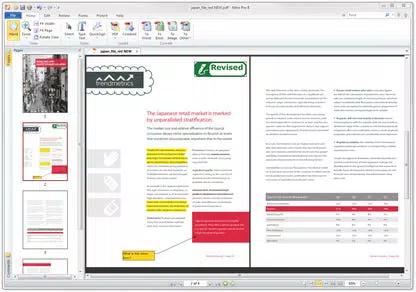
The user interface of Nitro PDF Reader (32-bit) follows a ribbon-style layout inspired by Microsoft Office, providing a familiar and intuitive experience for users accustomed to desktop productivity suites. The ribbon can be customized, allowing users to place frequently used tools in easily accessible locations. It can also be hidden to maximize screen space, offering flexibility based on user preference and task complexity.
Navigating through documents is straightforward, with smooth scrolling, responsive zoom controls, and a tabbed reading system that allows multiple PDFs to be open simultaneously. The search utility is efficient, enabling users to locate specific text across pages quickly. Although the developer did not list formal performance metrics, the app maintains stability during extended use and demonstrates consistent responsiveness across different document sizes.
Performance on older or low-memory systems is expected to be favorable due to the 32-bit architecture, which typically requires fewer system resources than 64-bit versions. The application remains stable during common tasks such as form filling, annotation, and file conversion. While no specific data on battery usage or background performance was provided, the absence of intrusive ads or pop-ups contributes to a clean user experience.
Platform Compatibility & Technical Requirements
Nitro PDF Reader (32-bit) is designed for the Windows operating system. The application is compatible with Windows platforms, though specific OS versions were not listed by the developer. The software has a file size of 112.2 MB, which is relatively compact for a full-featured PDF tool. This size suggests a streamlined installation with minimal bloat, suitable for systems with limited storage capacity.
Specific hardware or software requirements were not disclosed. The developer did not specify minimum OS requirements, making it unclear whether the app supports older versions like Windows 7 or newer releases such as Windows 11. Similarly, no details were provided regarding processor architecture, RAM, or graphics support. Compatibility information was not fully disclosed, so users should verify system readiness before installation.
Pros and Cons
Pros
- Free access to advanced PDF editing and annotation tools
- Familiar ribbon-style interface for ease of use
- Drag-and-drop PDF creation simplifies document conversion
- Supports secure digital signing and form filling
- Tabbed reading allows multiple documents to be open simultaneously
- Watermark-free editing and output
- Optimized for 32-bit systems, ideal for older or low-resource devices
Cons
- Specific OS compatibility details were not provided
- No information on minimum system requirements
- Anonymous usage data collection during installation may raise privacy concerns
- Drag-and-drop process has a brief delay on initiation
- Search functionality lacks federated in-document search features
- Developer did not provide performance benchmarks or optimization details
FAQ
Is Nitro PDF Reader (32-bit) safe to download and install?
Yes, the app is available as a free download and is distributed through official channels. No malicious components were reported in the provided information. Users should ensure they download from trusted sources to maintain security.
Can I use this app on Windows 10 or Windows 11?
While the app is designed for Windows, the developer did not specify compatibility with particular OS versions. It may work on Windows 10 or 11, but this cannot be confirmed without official requirements.
Is the app available for Android or iOS?
Based on the provided details, Nitro PDF Reader (32-bit) is only available for Windows. No information was given about mobile versions for Android or iOS.
Does the app collect personal data?
During installation, the app may request permission to contribute anonymous usage data. This can be declined by adjusting installation settings. No further details about data handling were provided.
How do I update Nitro PDF Reader (32-bit)?
Updates are typically delivered through the official installer. Users should check the developer’s website for the latest version. The current version is 3.5.1.12, released on April 9, 2024.
Final Thoughts
Nitro PDF Reader (32-bit) stands out as a powerful, free tool for managing PDF documents on Windows. Its combination of a user-friendly ribbon interface, robust editing capabilities, and efficient document conversion features makes it a compelling choice for professionals and casual users alike. The absence of watermarks and the inclusion of secure signing and form-filling tools enhance its practicality in real-world workflows.
While some technical details remain unspecified, the app delivers on its core promises with reliability and ease of use. It is especially valuable for users working on older systems or those seeking a lightweight yet full-featured PDF solution. For anyone needing a dependable, free PDF reader and editor, Nitro PDF Reader (32-bit) offers exceptional value.
Download Nitro PDF Reader (32-bit) now


